As I mentioned in my post
earlier this year, I'm exploring the use of large language models (LLM) for helping my daily
computing workflow. Since I'm trying to work on a multiferroics introductory
text -- its moving pretty slow -- I will need various graphics to put into the
text to show different types of phase ordering. So I thought well maybe
ChatGPT can help me out with writing the scripts for doing so. For this
specific case I wanted to see how it would do with the
TikZ LaTeX package. TikZ is a very powerful text to graphics package that lets you specify text
mark-up to create pretty amazing graphics. Its very popular in the physics
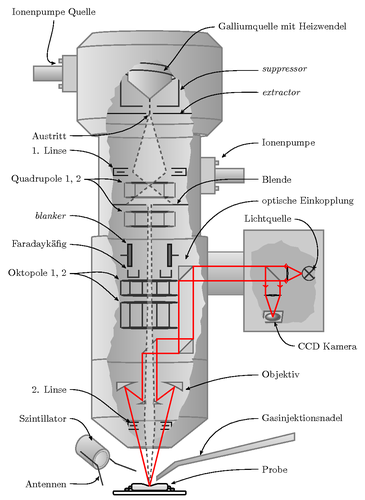
community, here's an example of a focus ion beam schematic that was created by
using only LaTeX style mark-up (🤯).
|
|
Focus Ion beam rendered in LaTeX using TikZ package (TeX File). © Clemens Helfmeier 2009.
|
However one of the difficulties with TikZ is the significant time investment
needed, both from a learning perspective and in creation of the initial
script. I figured this is a good task for ChatGPT to work on. I figured it
kind of makes sense to describe an image in natural language and tell ChatGPT
to convert it into the markup used in TikZ.
The first prompt I gave ChatGPT was:
Can you create a diagram of ferromagnetic and anti-ferromagnetic ordering
using the tikz latex package. Please provide the code.
To my surprise, it actually gave me something that rendered without any
errors:

|
Suppose to represent ferromagnetic and anti-ferromagnetic ordering.
|
which with regard to what I wanted, is wrong, but its a start. I then
proceeded to provide a series of asks and changes, first I indicated they need
to be the same size. Then that the first lattice be all one color and the
second be alternating colors. I had to correct it for the anti-ferromagnetic
ordering lattice since it kept placing like colors next to each other. Finally
I got something like this:

|
Ferromagnetic to anti-ferromagnetic ordering.
|
this was pretty good in my opinion. It took about 10 minutes but may have been
faster if I choose my prompts better and the server wasn't so slow to respond.
The final TikZ code is that generated the figure above is:
\documentclass{standalone}
\usepackage{tikz}

\begin{document}
\begin{tikz picture}[scale=0.6]

\filldraw[red] (0,0) circle (10pt);
\filldraw[red] (1,0) circle (10pt);
\filldraw[red] (2,0) circle (10pt);
\filldraw[red] (3,0) circle (10pt);
\filldraw[red] (4,0) circle (10pt);

\filldraw[red] (0,2) circle (10pt);
\filldraw[red] (1,2) circle (10pt);
\filldraw[red] (2,2) circle (10pt);
\filldraw[red] (3,2) circle (10pt);
\filldraw[red] (4,2) circle (10pt);

\filldraw[red] (0,4) circle (10pt);
\filldraw[red] (1,4) circle (10pt);
\filldraw[red] (2,4) circle (10pt);
\filldraw[red] (3,4) circle (10pt);
\filldraw[red] (4,4) circle (10pt);

\draw[->] (5,2) -- (6,2);

\filldraw[red] (7,0) circle (10pt);
\filldraw[blue] (8,0) circle (10pt);
\filldraw[red] (9,0) circle (10pt);
\filldraw[blue] (10,0) circle (10pt);
\filldraw[red] (11,0) circle (10pt);

\filldraw[blue] (7,2) circle (10pt);
\filldraw[red] (8,2) circle (10pt);
\filldraw[blue] (9,2) circle (10pt);
\filldraw[red] (10,2) circle (10pt);
\filldraw[blue] (11,2) circle (10pt);

\filldraw[red] (7,4) circle (10pt);
\filldraw[blue] (8,4) circle (10pt);
\filldraw[red] (9,4) circle (10pt);
\filldraw[blue] (10,4) circle (10pt);
\filldraw[red] (11,4) circle (10pt);
\end{tikzpicture}
\end{document}
It's pretty lengthy in my opinion and its only for a 3 by 5 lattice, so if I
wanted a larger lattice to display it would be even more text. In addition to
the color I wanted ChatGPT to create little arrows on each site pointing up or
down so I asked it the following:
Can you rewrite the script to utlize for loops in the tikz package to make
it shorter. In addition please add arrows to each circle. For the red
circles make them all point down, that is spin-down, and the arrows for the
blue circles point up, spin-up. Apply this to both lattices.
This gave me a mix of things and after a series of back and forth, having it
correct the location and direction of the arrows as well as telling ChatGPT
that something was wrong with the conditional statements it had implemented,
we arrived at something useful and compact. It took many back and forths until
I got exactly what I wanted, probably like an hour to be honest. I could have
just done most of what I wanted myself once ChatGPT provided me with the for
loop version of the tikz mark-up it probably would have been faster to just
make changes myself. Here is the final result:

|
|
ChatGPT's final result after an hour of back and forth. Looks good!
|
So to summarize this was produced primarily using ChatGPT and all I had to do
was continuely tell ChatGPT what was wrong and what I wanted. I noticed that
when I provided the corrected code that ChatGPT original provided, the next
requests for changes were much better. The final TikZ LaTeX mark-up is:
\begin{tikzpicture}

\foreach \y in {0,2,4,6,8,10} {
    \foreach \x in {0,1,2,3,4,5} {
        \filldraw[red] (\x * 2,\y) circle (10pt);
        \draw[black,->, >=stealth, line width=1.5pt] (\x * 2,\y+0.75) -- (\x * 2,\y-0.75);
    }
}
\draw[black,->, >=stealth, line width=1.5pt] (11,5) -- (13,5);

\foreach \y in {0,4,8} {
    \foreach \x in {0,1,2,3,4,5} {
        \filldraw[{\ifodd\numexpr\x+\y\relax red\else blue\fi}] (14 + \x * 2,\y) circle (10pt);
        \filldraw[{\ifodd\numexpr\x+\y+1\relax red\else blue\fi}] (14 + \x * 2,\y + 2) circle (10pt);
        \ifodd\numexpr\x+\y\relax
            \draw[black,->, >=stealth, line width=1.5pt] (14 + \x * 2,\y-0.75) -- (14 + \x * 2,\y+0.75);
            \draw[black,->, >=stealth, line width=1.5pt] (14 + \x * 2,\y + 2 + 0.75) -- (14 + \x * 2,\y + 2 - 0.75);
        \else
            \draw[black,->, >=stealth, line width=1.5pt] (14 + \x * 2,\y+0.75) -- (14 + \x * 2,\y-0.75);
            \draw[black,->, >=stealth, line width=1.5pt] (14 + \x * 2,\y + 2 - 0.75) -- (14 + \x * 2,\y + 2 + 0.75);
        \fi
    }
}
\end{tikzpicture}
What I'm beginning to experience with ChatGPT is its best used to do the initial
heavy lifting and then you can come in and tweak things so that its almost right
and finally having ChatGPT polish things for you.
Postscript
After I finished, I went back and asked ChatGPT to create a simple cubic 3D
projection given the 2D image we constructed. I also asked it to draw the unit
cell lines. Surprisingly it did this without any issue for the ferromagnetic
lattice, but could not get anything remarkably representative for the
anti-ferromagnetic one.

|
|
Asking ChatGPT to turn it into a 3D perspective given its simple cubic.
|
Reuse and Attribution